Some time ago I wrote a post about how to run Autodesk Inventor 2013 on Windows 8 and people were very interested what other Autodesk software can be run on the newest Microsoft’s operating system.
Well, quoting Autodesk in their page:
“Autodesk product versions of 2009 and earlier are no longer supported and are not included in considerations of Windows 8 compatibility”.
As it turns out they do not (and will not) support anything earlier than their 2010 product line. That is bad news if you are running something older than that, meaning that an operating system upgrade would require you to upgrade your software. Otherwise, all software newer than 2009 line should install and run properly on a Windows 8 machine.
Autodesk also added a list of tested and confirmed working software on Windows 8:
- Autodesk 3ds Max 2013
- Autodesk 3ds Max Design 2013
- Autodesk Maya 2013
- Autodesk MotionBuilder 2013
- Autodesk Mudbox 2013
- Autodesk Softimage 2013
- Autodesk SketchBook Designer 2013
Personally I have tried running Autodesk Inventor 2013 and 2012, Autodesk Showcase 2013, Autodesk 3dsmax 2013 and Autodesk AutoCAD 2013. The installations ran without hiccups, and software ran smoothly. So the mentioned products could also be added to the list.
Quoting Autodesk once more:
“Product Support will provide its best effort to assist customers who have issues with products that are not currently supported.”
That means that if you are an owner of any software that is from 2010, 2011, 2012 and 2013 product line – fear not. Autodesk and its trusty support crew will help you install it and run it on your Windows 8 machine.
You can find Autodesk’s support here, or, if you use Twitter, @AutodeskHelp
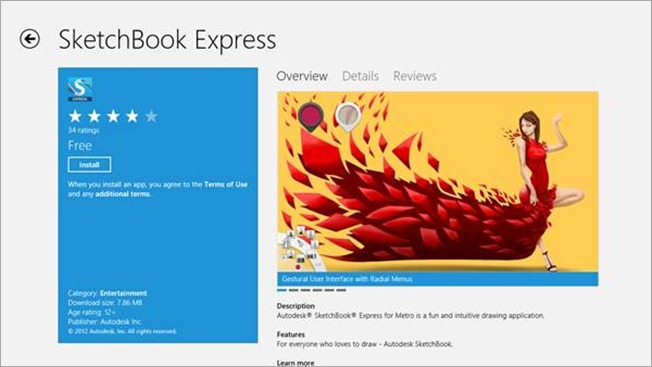
Autodesk Sketchbook Express
Now, for the more interesting things:
Autodesk has released a brand new piece of software for Windows 8. It is called Autodesk Sketchbook Express. It is an app, created for Windows Metro interface (meaning, it can run on Windows RT devices as well) and is fully integrated in the Windows 8.
Do not forget that this is an app, it will only run from start menu. Oh, and the best thing is – it is free!
This app is especially useful if you have a touchscreen PC screen (or a PC itself), a Windows Surface tablet, or any other tablet that can run any version of Windows 8. It is an ultimate sketching tool, provided that you have an access to a stylus.
The amazing thing is, you can even use it as a quick sketchpad (or notepad) while you are actually doing something important, that needs constant note taking or sketching. Just drop it to the right of the screen and there you have it, a quick and intuitive e-sketchpad. Here is an instance of Autodesk Sketchbook Express running side-by-side with Autodesk Inventor 2013 on Windows 8:

Have fun using it. If you have any other questions, or just want to say hi, drop a comment in the comment section below.